

Digital printing for business cards: quality and impact
TL;DR:
- Modern digital presses achieve high-resolution, vibrant, and premium-quality business cards comparable to offset.
- Digital printing offers unmatched flexibility for short runs, design changes, and variable data customization.
- Outdated views underestimate digital printing’s capabilities; it is now a preferred choice for premium branding.
Most professionals assume digital printing means lower quality, faster output, and compromised results. That assumption is outdated. Modern digital presses now deliver up to 2400 dpi resolution, sharp gradients, and near-perfect color accuracy on business cards. The gap between digital and traditional offset has narrowed to the point where, for most custom card projects, digital is not just acceptable. It is the smarter choice. This guide breaks down how digital printing works, what quality benchmarks to expect, and how to use it strategically for premium business card branding.
Table of Contents
- What is digital printing for business cards?
- How digital printing delivers premium quality
- Customization and creative possibilities with digital printing
- Choosing the right printing method for premium business cards
- Rethinking business card printing: Go beyond old assumptions
- Elevate your brand with custom digital printing solutions
- Frequently asked questions
Key Takeaways
| Point | Details |
|---|---|
| High-resolution quality | Digital printing delivers sharp, detailed business cards that rival traditional offset methods. |
| Customization options | Digital presses enable personalization and design flexibility without sacrificing speed or quality. |
| Fast and efficient | Short-run and quick-turnaround projects are ideally suited for digital business card printing. |
| Creative possibilities | Unique finishes and specialty stocks are easily accessible with modern digital presses for premium branding. |
What is digital printing for business cards?
Digital printing transfers ink directly from a digital file to the card stock. No printing plates, no film, no lengthy setup. The press reads your file and prints it. That is the core difference from offset printing, which requires plates to be made before a single card is produced.
For business cards, this matters in practical ways. You can print 25 cards as easily as 2,500. You can change the design between print runs without extra cost. You can include variable data, meaning each card in a batch can carry a different name, title, or QR code.
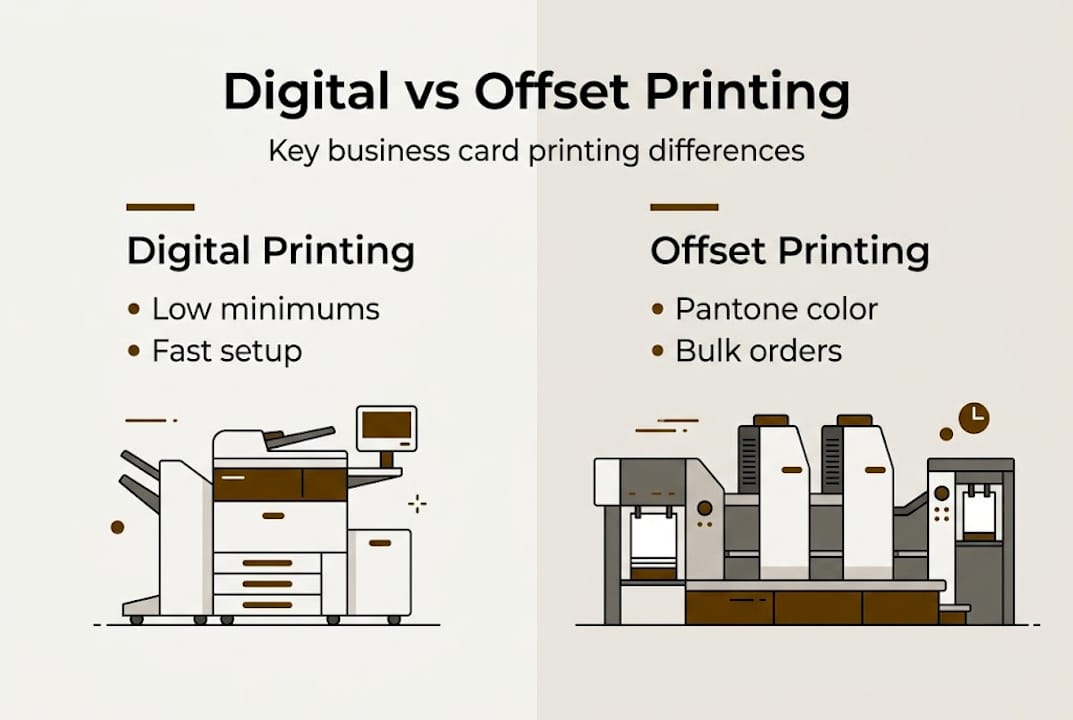
How it compares to offset printing:
| Feature | Digital printing | Offset printing |
|---|---|---|
| Minimum run size | As low as 1 card | Typically 250+ |
| Setup cost | None | Plate fees apply |
| Turnaround | Fast, often 1 to 3 days | Longer, 5 to 10 days |
| Color consistency | Excellent for most needs | Superior for exact Pantone |
| Variable data | Yes, per card | Not practical |
| Best for | Custom, short-run, fast | Large volume, exact color |
Modern digital presses like the HP Indigo series produce high-resolution output up to 2400 dpi with sharp text, photographic images, and smooth color gradients. For most business card projects, this is more than sufficient. Offset printing still holds an edge for exact Pantone color matching and large solid color fields, but that edge matters in fewer situations than most people think.
When you explore the best business card printing services, digital printing consistently appears as the top choice for custom, small-batch, and design-forward projects.
Key advantages of digital printing for business cards:
- No minimum order quantity
- Fast turnaround without sacrificing quality
- Easy design changes between batches
- Variable data per card
- Lower cost for short runs
Pro Tip: If your cards include photography, complex gradients, or you need fewer than 500 copies, digital printing is almost always the better choice. Offset only pulls ahead when you need thousands of identical cards with exact Pantone spot colors.
How digital printing delivers premium quality
Quality in printing is not just about how sharp a card looks on screen. It is about how it holds up in person, under different lighting, and when someone handles it. Digital printing has reached a point where the technical benchmarks are genuinely impressive.
The HP Indigo press, one of the leading digital platforms for premium card production, operates at 812 dpi with 8-bit depth, which translates to a virtual resolution of 2438 x 2438 dpi. It supports up to 290 lpi screens and achieves 97% Pantone coverage with color accuracy targets of ΔE 2 to 3. In plain terms, that means colors are reproduced with very little visible deviation from the original design.
What these numbers mean for your cards:
- Sharp text at very small sizes, even 6pt or 7pt, stays clean and readable
- Photographic images reproduce with depth and detail
- Smooth gradients do not show banding or color steps
- Brand colors match closely to your approved palette
Digital vs. offset print quality benchmarks:
| Quality metric | Digital (HP Indigo) | Offset |
|---|---|---|
| Resolution | Up to 2438 dpi virtual | 2400 dpi typical |
| Screen ruling | Up to 290 lpi | Up to 300 lpi |
| Pantone coverage | 97% | Up to 100% |
| Color accuracy (ΔE) | 2 to 3 | 1 to 2 |
| Gradient smoothness | Excellent | Excellent |
The difference in color accuracy between ΔE 2 and ΔE 1 is often invisible to the naked eye. For most branding applications, digital output is indistinguishable from offset when examined by a non-specialist.
Understanding the full luxury branding process helps you know what to look for when reviewing proofs. Always check text sharpness at small sizes, gradient transitions in logo marks, and color consistency across the full card face. The luxury business card printing guide covers what separates a premium result from an average one.
Customization and creative possibilities with digital printing
Print quality is key, but digital printing’s real strength lies in creative flexibility. No other method gives you this level of control over individual card details without driving up cost or production time.
Variable data printing on modern presses like the HP Indigo means each card in a set can carry unique information. Names, titles, phone numbers, QR codes, even color schemes can change from card to card within a single print run. This is not a workaround. It is a built-in capability.
How to set up a personalized card project:
- Define your base design, the layout, colors, and typography that stay consistent
- Identify which elements change per card, such as name, title, or contact details
- Prepare a data file, typically a spreadsheet, with each variable mapped to its field
- Submit both the design file and the data file to your printer
- Review a digital proof for each variant before approving the full run
- Approve and print
This process makes it practical to produce cards for an entire team in one order, each fully personalized, without paying for separate setups.
“Digital printing removes the barrier between a great idea and a finished card. You are not constrained by what a plate can do. You can print a different image on every single card if the concept calls for it.”
Pro Tip: Use variable data for tiered networking. Print one version of your card for general contacts and a second version with a private email or direct line for high-value connections. Both versions come from the same order.
For inspiration on how to use this flexibility in your design, the guide on unique business card design shows real examples of cards that stand out. You can also explore unique card solutions for formats and finishes that pair well with digital printing.
Choosing the right printing method for premium business cards
Creative options are valuable, but choosing the right approach is what delivers premium results. Not every project is a perfect fit for digital printing, and knowing when to use each method saves time and money.
When digital printing is the right choice:
- You need fewer than 500 cards
- You want different versions for different team members or events
- Your design includes photography, gradients, or complex artwork
- You need cards quickly
- You want to test a design before committing to a large run
- Your cards include QR codes or other variable elements
When offset printing makes more sense:
- You need 1,000 or more identical cards
- Your brand requires exact Pantone spot color matching
- Your design features large solid color fields that must be perfectly consistent
- You are adding specialty effects like letterpress or engraving that require plate-based processes
Offset printing remains the better option for exact Pantone matching and large solid fields, but digital excels across most run sizes and customization needs. The decision is not about which method is better overall. It is about which method fits your specific project.
Material compatibility is another factor. Digital presses work well with a wide range of premium paper stocks, including textured, coated, and uncoated options. Many finishing techniques, including soft touch lamination, spot UV, and foil, can be applied after digital printing. The luxury printing guide details which combinations work best.
Pro Tip: Combine both methods for maximum impact. Use digital printing for a short personalized run and offset for a larger general supply. This gives you flexibility for targeted outreach without overpaying for your standard stock.
If you are building a card from scratch, the business card design framework walks through each decision point, from layout to finish, so you arrive at print-ready files with confidence.
Rethinking business card printing: Go beyond old assumptions
Stepping back from the technical details, the bigger issue is that most professionals still carry an outdated mental model of what digital printing can do. The assumption that offset equals quality and digital equals compromise was reasonable ten years ago. It is not accurate today.
High-end clients, design studios, and brand-conscious professionals increasingly choose digital for its flexibility and color vibrancy. The results speak for themselves. Cards printed on an HP Indigo press with premium stock and a skilled design behind them are not second-tier products. They are premium products.
The more important variable is not the printing method. It is the design quality, the material selection, and the expertise guiding the project. A poorly designed card printed on the best offset press in the world is still a poorly designed card. The reverse is also true. Expert design on a well-run digital press produces results that hold up in any room.
Stop letting old assumptions limit your options. Evaluate digital printing on its current capabilities, not its reputation from a decade ago.
Elevate your brand with custom digital printing solutions
If this guide has shifted how you think about digital printing, the next step is putting it into practice. BcardsCreation works with professionals who want more than a standard card. Every project starts with a design consultation, material selection, and a clear brief, no templates, no automated editors.
Whether you need a small personalized batch or a fully custom design built around your brand identity, we handle the entire process. Browse custom business card design options to see what is possible, or explore luxury creative card options including foiling and specialty finishes. Start your project today and get cards that actually represent your brand.
Frequently asked questions
Does digital printing look as good as offset printing for premium business cards?
Modern digital printing produces sharp text, rich colors, and smooth gradients that are comparable to offset for most business card needs. High-resolution digital output on presses like the HP Indigo is often indistinguishable from offset to the naked eye.
What types of finishes and materials work with digital printing for business cards?
Digital presses support a wide range of premium paper stocks and textured materials, and cards can receive finishes like soft touch lamination, spot UV, or foil after printing. Modern digital presses expand finishing and material options well beyond what older technology allowed.
Can I print unique details or names on each business card with digital printing?
Yes, digital printing supports variable data, so each card in a batch can carry a different name, title, QR code, or contact detail without extra setup cost. Variable data printing on presses like the HP Indigo handles this natively.
What is the turnaround time for digitally printed business cards?
Digital printing allows for significantly faster turnaround than offset, with many custom projects completed in one to three business days. Short runs and fast output are among the core advantages of digital over traditional methods.
Recommended
- Top printing techniques for cards that elevate your brand – BcardsCreation
- Business Card Printing Process for Luxury Branding – BcardsCreation
- Clear business cards: one or double-sided printing? – BcardsCreation
- Design a unique business card that sets your brand apart – BcardsCreation
- 7 praktische Lasergravur Vorteile für Unternehmer und Designer – Laserdienstleistungen


