

The Dos and Don'ts of Business Cards in 2026
TL;DR:
- Effective business cards clearly communicate who you are, your role, and a single contact method to prompt follow-up.
- Design with clarity, white space, and professional material choices while avoiding overcrowding and outdated information.
The dos and don’ts of business cards are the essential rules that determine whether your card communicates effectively or gets discarded after a first meeting. A well-executed card answers three questions immediately: who you are, what you do, and how to reach you. Get those three right, and the card works. Miss them, and no amount of creative printing saves it. This article covers the core design principles, etiquette rules, QR code best practices, and common mistakes that business professionals need to know in 2026.
1. The dos and don’ts of business cards: start with the essentials
The most effective business cards answer three questions clearly: who you are, what you do, and how to reach you. That means your name, your role or company, and one primary contact method. Not three phone numbers, not two email addresses. One clear path to follow up.

Clarity beats completeness every time. Your card is not a resume or a brochure. It is a prompt for the next step, whether that is a call, an email, or a visit to your website. Every element on the card should serve that single purpose.
Pro Tip: If you are unsure what to cut, ask yourself: “Does this help someone contact me or remember who I am?” If the answer is no, remove it.
White space is not wasted space. Preserving white space supports readability and signals confidence in your brand. Crowded cards look uncertain. Clean cards look authoritative.
2. What to include on a business card
- Full name — spelled exactly as you use it professionally
- Job title or role — specific enough to be meaningful, short enough to scan quickly
- Company name and logo — placed consistently with your brand guidelines
- One primary contact method — email or phone, not both unless your role requires it
- Website or LinkedIn URL — one digital destination, not five
- Physical address — only if location matters to your clients (retail, law firm, medical practice)
The professional design standard for business cards prioritizes brand alignment alongside information hierarchy. Your font, color palette, and logo placement should match your other brand materials exactly. A card that looks disconnected from your website or letterhead signals inconsistency, not creativity.
Material choice carries weight too. Thick stock, soft-touch lamination, or specialty finishes like foil communicate quality before anyone reads a single word. For professionals in finance, law, or consulting, that tactile signal matters. A financial advisor at a firm like Ledger One CFO understands that every client touchpoint reflects on credibility, and the card is no exception.
3. Key don’ts in business card design
Knowing what to avoid is as important as knowing what to include. These are the most common mistakes that reduce a card’s effectiveness.
- Overcrowding — too much text forces the eye to work too hard; recipients stop reading
- Font sizes below 8pt — print-safe minimum sizes exist for a reason; anything smaller becomes unreadable in standard lighting
- Low-contrast color combinations — gray text on a light background fails in dim environments like restaurants or conference halls
- Outdated contact information — a wrong phone number or dead email address is worse than no card at all
- Multiple fonts — more than two typefaces on a single card creates visual noise, not personality
- Glossy finishes on writable surfaces — if clients need to add notes, matte or uncoated stock on the back is a practical choice
Pro Tip: Print a single proof at actual size and hold it at arm’s length under normal room lighting before approving any order. What looks sharp on screen often reads as cluttered at 3.5 by 2 inches.
One overlooked mistake is using a personal email address on a professional card. A Gmail address on a card from a senior executive signals that the business infrastructure is not fully established. Use a domain-matched email.
4. How and when to exchange business cards
Business card etiquette is the part most professionals underestimate. The physical exchange is a social signal, and poor timing or handling can undo a strong first impression.
- Wait for the right moment. Cards exchanged after rapport feel natural. Cards handed out in the first thirty seconds of a conversation feel transactional. Let the conversation establish value first.
- Present the card face up. Hand it with both hands if the setting is formal or if you are meeting someone from a culture where this is standard practice, particularly in Japan, South Korea, or China.
- Receive cards with care. Take a moment to read the card before putting it away. Setting it on the table during a meeting shows respect. Stuffing it in a pocket immediately does not.
- Never write on a card in front of the recipient. Writing on someone’s card in their presence is considered disrespectful in many professional and cultural contexts. Make notes after the meeting.
- Do not interrupt to distribute cards. Handing out cards while someone else is speaking, or moving around a room distributing them like flyers, signals that you are more interested in volume than connection.
Etiquette reduces the transactional feel of card exchange. When you give a card at the right moment, after a meaningful exchange, it functions as a natural continuation of the conversation rather than a sales move.
5. How to use QR codes on business cards correctly
QR codes add real utility to business cards when placed and labeled correctly. Used poorly, they add visual clutter and get ignored.
- Use dynamic QR codes. Dynamic codes allow updates to the destination URL without reprinting the card. Static codes lock in a URL permanently, which becomes a problem when websites change or contact details are updated.
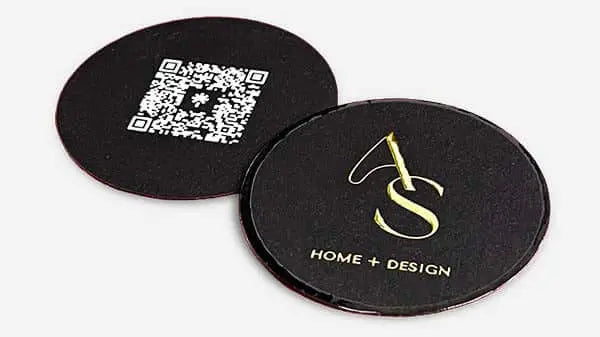
- Place the QR code on the back. The back side works as operational space for QR codes, taglines, and secondary information. The front should stay clear for instant recognition.
- Add a call-to-action label. A label like “Scan to connect” removes ambiguity. Recipients need a reason to scan and a clear expectation of what they will find.
- Maintain the quiet zone. The white border around a QR code is not decorative. The quiet zone is critical for scan reliability. Design elements that encroach on this border cause scan failures.
- Link to a mobile-optimized destination. A QR code that opens a desktop-only website on a phone creates friction. Link to a vCard, a portfolio page, or a contact form built for mobile.
- Test before printing. Scan the QR code from the proof file on multiple devices before approving a full print run.
| QR Code Practice | Why It Matters |
|---|---|
| Dynamic code | Update destination without reprinting |
| Back placement | Keeps front clean and scannable |
| Call-to-action label | Increases scan rate by reducing hesitation |
| Quiet zone preserved | Prevents scan failures at edges |
| Mobile-optimized link | Reduces friction after scanning |
6. Common mistakes vs. best practices: a side-by-side comparison
The gap between a card that works and one that does not often comes down to a handful of specific choices. This comparison covers the most frequent errors and their practical alternatives.
| Common Mistake | Best Practice |
|---|---|
| Multiple phone numbers and emails | One primary contact method per card |
| Font size below 8pt | Minimum 8pt for body text, 10pt preferred |
| Static QR code with no label | Dynamic QR code with “Scan to connect” label |
| Outdated job title or phone number | Review and reorder cards when details change |
| Writing on a card in front of recipient | Note details privately after the meeting |
| Glossy finish on both sides | Matte or uncoated back for note-taking |
The pattern across these mistakes is the same. Each one prioritizes appearance or convenience for the sender over usability for the recipient. The step-by-step design framework that works consistently puts the recipient’s experience first. What can they read quickly? What can they act on immediately? Those two questions drive every good design decision.
Key takeaways
Effective business cards work because they combine clear content, professional design, and respectful etiquette into a single physical object that prompts follow-up.
| Point | Details |
|---|---|
| Content clarity | Include name, role, and one contact method. Remove everything else that does not aid follow-up. |
| Design legibility | Use a minimum 8pt font, high contrast, and preserved white space to keep cards readable. |
| QR code placement | Place dynamic QR codes on the back with a call-to-action label and intact quiet zone. |
| Exchange etiquette | Give cards after rapport is established, present face up, and never write on a received card in front of the recipient. |
| Material quality | Card stock and finish communicate professionalism before the recipient reads a single word. |
What I have learned from years of watching cards succeed and fail
Most professionals focus on what to put on a card. The more useful question is what to leave off.
I have reviewed hundreds of card designs over the years, and the ones that fail almost always share one trait: the designer tried to include everything. Two phone numbers, a fax number nobody uses, three social media handles, a tagline, a QR code, a headshot, and a logo. The card becomes a puzzle instead of a prompt.
The cards that work are almost always quieter. They have room to breathe. The name is large enough to read without squinting. The contact method is obvious. The finish feels considered, not accidental.
One thing I tell every client: print a proof and carry it for a week before approving the full order. Hand it to a colleague in a hallway. Watch how they hold it, what they read first, whether they flip it over. That five-second observation tells you more than any screen preview.
The etiquette side is where I see the most overlooked opportunity. Professionals who wait for the right moment to offer a card, who receive cards with genuine attention, consistently make a stronger impression than those who distribute cards like conference lanyards. The card is a signal of how you do business. Make it a good one.
The 2025 business card trends confirm what I have observed directly: restraint and quality are winning over novelty and volume. That is not a trend. That is a return to what always worked.
— Kostiantyn
Custom business cards built around these principles
Bcardscreation designs and produces fully custom business cards for professionals who treat their card as a branding tool, not a commodity. Every project starts with a design consultation, not a template. Material selection, finish options, and information hierarchy are reviewed individually for each client. The result is a card that reflects your brand accurately and holds up to the standards described in this article. If you are ready to get the details right, explore custom business card design at Bcardscreation. For professionals who want a more distinctive physical presence, luxury foil business cards are also available.
FAQ
What information should always go on a business card?
Your name, job title, company name, and one primary contact method are the non-negotiable elements. Three core questions drive the content decision: who you are, what you do, and how to reach you.
What is the minimum font size for a business card?
The print-safe minimum is 8pt for body text. Anything smaller risks becoming unreadable at standard card size, particularly under dim lighting at networking events.
When is the right time to hand out a business card?
Wait until after meaningful conversation or until someone requests your contact details. Handing out cards immediately signals a transactional approach and reduces the card’s perceived value.
Should I use a QR code on my business card?
Yes, if it links to something useful and is placed correctly. Use a dynamic QR code on the back of the card with a clear label like “Scan to connect,” and always test it on multiple devices before printing.
How often should I update my business cards?
Update your cards any time your contact information, job title, or company changes. Outdated cards create confusion and reflect poorly on your attention to detail.


