

Why busy clear business cards fail to connect in 2026
As a busy professional or designer, you might assume that packing your clear business card with information and intricate visuals enhances your brand, but the reality is often the opposite. Busy clear business cards are often assumed to look striking but frequently cause readability issues and confuse recipients. This article breaks down why prioritizing clarity and simplicity boosts connection and brand perception. You will learn how to fix common design pitfalls that cause these failures.
Table of Contents
- Why Busy Designs Harm Clear Business Cards
- Key Principles For Effective Clear Business Card Design
- Comparison Of Busy Vs Effective Clear Business Card Layouts
- Applying Design Best Practices To Your Clear Business Cards
- Elevate Your Brand With Expertly Designed Clear Business Cards
- Frequently Asked Questions
Key takeaways
| Point | Details |
|---|---|
| Clear cards with excessive design elements reduce readability and professional impression. | Cluttered layouts make it hard for recipients to quickly identify your contact information. |
| Prioritizing essential contact information improves usability and brand clarity. | Name, role, company, and primary contact method are all you need. |
| Proper font size, spacing, and white space are vital for legibility, especially for clear cards. | Minimum 7pt fonts with increased letter spacing prevent readability issues. |
| Busy cards often signal lack of attention to detail, undermining brand trust. | Poor design choices communicate carelessness rather than creativity. |
| Choosing quality stock and finishes signals professionalism and durable value. | Premium materials like 350–400gsm cardstock elevate perceived quality. |
Why busy designs harm clear business cards
Transparency changes how a layout is perceived in fundamental ways. Unlike paper cards, clear plastic allows light and background elements to pass through the design. When too many elements are used, dense text, multiple graphics, or complex backgrounds, the result can look cluttered and difficult to read.
The use of thin fonts and intricate patterns on clear cards exacerbates readability problems, especially in low light conditions. This is a critical issue because business cards are often exchanged in environments with varying lighting. Recipients may be in dimly lit restaurants, trade show booths, or conferences where poor visibility makes your card nearly impossible to read.
Busy layouts crowd essential info, making it difficult for recipients to find key details when they need them most. Complex backgrounds and overlapping elements create visual noise that distracts from brand messaging rather than enhancing it. Poor readability signals lack of professionalism and attention to detail, damaging brand perception at the exact moment you need to make a strong impression.
Overlapping visual layers and reflections reduce contrast and clarity on transparent materials. The very feature that makes clear cards distinctive, their transparency, becomes a liability when too many design elements compete for attention. Light passing through the card interacts with background surfaces, creating unpredictable visual effects that further diminish legibility.
Common mistakes designers make include:
- Using script fonts or thin typefaces that disappear against busy backgrounds
- Layering multiple graphics that create confusing visual hierarchies
- Applying intricate patterns that conflict with the transparent substrate
- Cramming too much information without adequate spacing
- Ignoring how reflections and lighting affect the final appearance
Pro Tip: Hold your clear card design against different colored backgrounds and under various lighting conditions during the proofing stage. If key information becomes hard to read in any scenario, simplify immediately.
These common business card mistakes are amplified on transparent materials where every design choice is visible and scrutinized. The transparency that should showcase your brand sophistication instead reveals design flaws that would be hidden on opaque cardstock.
Key principles for effective clear business card design
Transparent materials reward disciplined design where strong typography, limited elements, and thoughtful use of negative space take center stage. Think of clear cards as a minimalist medium where simplicity strengthens impact rather than diminishing it. This approach requires you to make strategic choices about what to include and, more importantly, what to leave out.
Prioritizing essential contact information is crucial for effective business card design. Focus on core info only: name, role, company, primary contact method, and website for instant recognition. Every additional element you add dilutes the impact of these critical details and increases cognitive load for recipients trying to scan your card quickly.
Typography becomes even more critical on transparent substrates. A minimum font size of 7pt is crucial for essential contact details on business cards, but this standard should be considered the absolute floor for clear cards. Choosing thicker fonts with increased letter spacing and greater width improves reading acuity in low vision readers and helps all recipients process information faster.

White space is your most powerful design tool on clear cards. Employ ample white space to separate information blocks and reduce visual noise. This negative space gives recipients’ eyes a place to rest and creates clear pathways through your information hierarchy. Without adequate spacing, even well chosen fonts and colors merge into an illegible mass.
Create a clear information hierarchy with safe margins so key details stand out immediately. Your name should be the most prominent element, followed by your role and company, with contact details sized appropriately for quick scanning. Safe margins prevent essential information from being cut off during production and ensure your design works even when held at various angles.
Design principles for clear cards:
- Establish a single focal point (typically your name or logo)
- Use only one or two font families maximum
- Maintain consistent alignment throughout the layout
- Leverage transparency as a design feature, not a canvas to fill
- Test readability by viewing the design at actual size, not just on screen
Pro Tip: Create a mockup by printing your design on acetate or transparency film at actual size. Hold it against different backgrounds to see how the transparency affects readability in real world conditions.
These business card design principles for luxury brands apply equally to all professionals seeking to project sophistication. The essential business card design tips remain consistent: clarity, hierarchy, and restraint always win over complexity.
Comparison of busy vs effective clear business card layouts
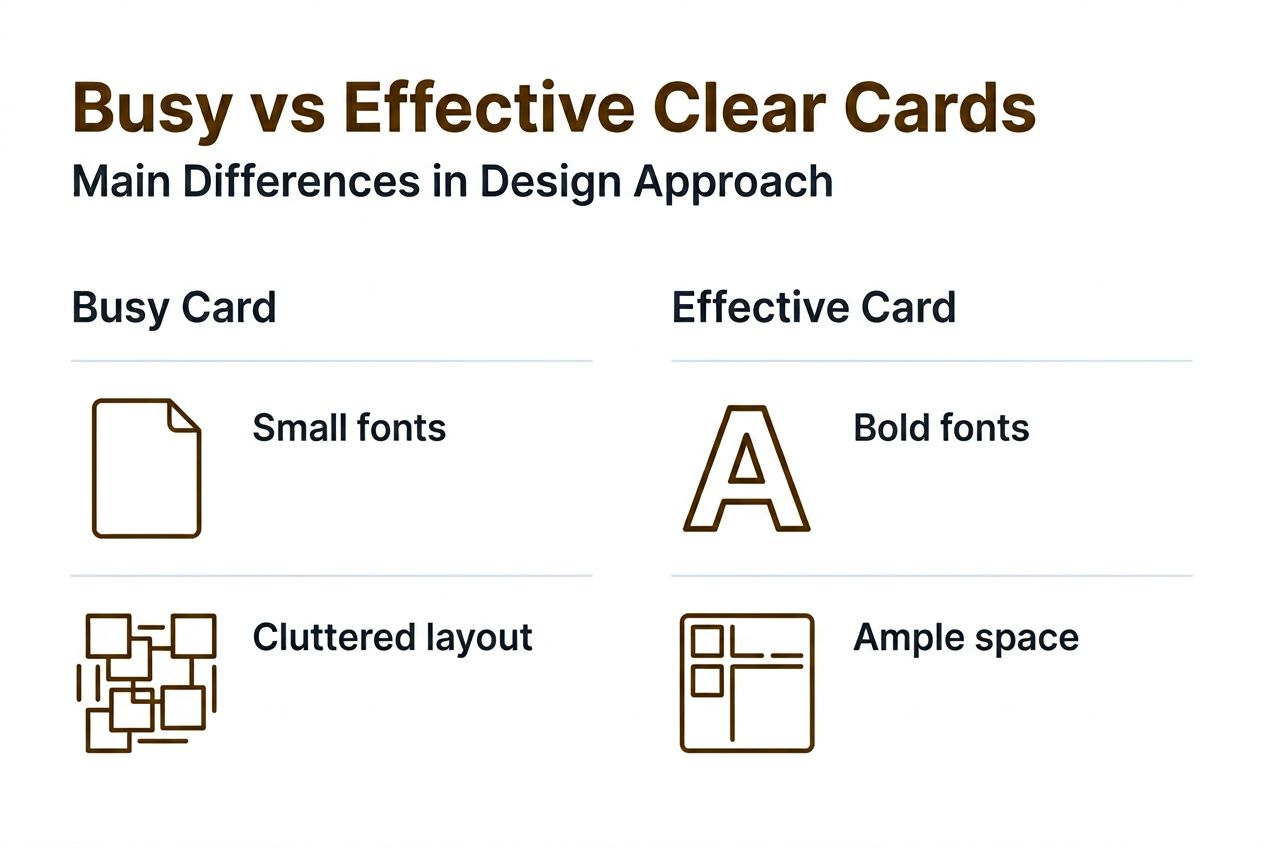
Seeing the differences side by side clarifies the impact layout choices have on clear card effectiveness. Busy designs cram multiple fonts, thin text sizes, overlapping graphics, and patterns reducing clarity at every touchpoint. These cards might look interesting in design software, but they fail in the recipient’s hand.
Effective designs use simple fonts, minimum sizes, clear hierarchy, and generous white space on safe margins. They treat the transparency as a feature that enhances the design rather than a challenge to overcome with more visual elements. The restraint shows confidence and professionalism.
| Design Element | Busy Clear Card | Effective Clear Card |
|---|---|---|
| Font choices | 3+ different typefaces, mix of scripts and serifs | 1-2 fonts maximum, legible sans serifs |
| Text size | Below 7pt for secondary info, inconsistent sizing | 7pt minimum, consistent hierarchy |
| Layout density | Crowded with overlapping elements, no breathing room | Generous spacing, clear separation of info blocks |
| Visual elements | Multiple logos, patterns, background graphics | Single focal point, minimal decorative elements |
| White space | Less than 20% of card area | 40-50% of card area for visual rest |
| Readability | Difficult to scan quickly, especially in poor light | Instantly legible in various lighting conditions |
Quality stock and finishes like thicker cardstock and spot UV finishes enhance tactile perception of professionalism. When you combine clean design with premium materials, you signal that you value quality and attention to detail. Recipients notice the difference immediately.
Poor design choices on clear cards can undermine brand perception, signaling a lack of attention to detail and professionalism. Clear business cards with clutter signal cheapness and distract from brand messaging, increasing discard rates. You have invested in a premium material, so your design must match that quality level.
The comparison reveals a fundamental truth: simplicity on transparent materials projects confidence and sophistication. Complexity suggests you are trying too hard or lack the design discipline to edit effectively. Recipients make these judgments subconsciously but quickly, often within seconds of receiving your card.
Applying design best practices to your clear business cards
Implementing these actionable steps equips you to design clear business cards that captivate and communicate professionally. The goal is to create cards that recipients keep, reference, and remember rather than discard.
-
Identify your card’s core purpose and limit content to essential contact info only. Ask yourself what action you want recipients to take, then include only the information that supports that goal.
-
Use legible fonts of at least 7pt with increased letter spacing. Avoid thin scripts or ornate fonts that sacrifice readability for aesthetic appeal.
-
Incorporate white space intentionally to separate design elements and improve scanning. Think of white space as an active design element that guides the eye, not wasted real estate.
-
Select quality materials and finishes like 350–400gsm cardstock, soft touch, spot UV, or foils to signal quality and avoid the bin. Premium materials communicate that you value lasting impressions.
-
Proof designs on various lighting and at actual size for readability, especially for clear materials. Screen mockups cannot replicate how transparency interacts with real world environments.
-
Avoid cramming contact info, multiple logos, or promotional taglines that create visual noise and diminish effectiveness. Treating your card like a mini flyer backfires by overwhelming recipients.
Pro Tip: Create a simple test by showing your design to someone unfamiliar with your brand for three seconds, then ask them to recall your name and one contact method. If they struggle, your layout needs more clarity and hierarchy.
These steps align with a comprehensive business card design framework that ensures consistency across all brand touchpoints. When briefing a business card designer, communicate your preference for minimalism and clarity explicitly.
Design discipline separates memorable clear business cards from forgettable ones. You must resist the temptation to fill every available space or showcase every design technique you have learned. The most effective clear cards often feature the least complex layouts because simplicity allows the unique transparent material to shine.
Consider working with experienced designers who understand the specific challenges of transparent materials. They can help you avoid common pitfalls while creating a design that feels uniquely yours. Professional guidance often saves time and money by getting the design right on the first print run.
Elevate your brand with expertly designed clear business cards
Ready to bring these principles to life? Our custom clear business card options combine quality materials with expert design to ensure clarity and professionalism that recipients notice immediately. We understand that transparency requires a different design approach, and we have refined our process to maximize impact while maintaining readability.
Choose from unique designs and premium finishes to make your brand memorable and readable in any environment. Our creative business cards printing and foiling services deliver the sophisticated look you need without sacrificing functionality. Get personalized help to avoid common pitfalls of busy designs and create impactful business cards that align with your brand strategy.
Explore our collections and custom business card design services tailored for beauty professionals, designers, and boutique brands who recognize that business cards are strategic branding tools. We work individually with each client to develop solutions that differentiate you in competitive markets.
Frequently asked questions
Why do busy designs reduce clear business card effectiveness?
Excessive design elements reduce readability on transparent backgrounds because light passes through the material and interacts with whatever surface is behind the card. This creates unpredictable visual interference that makes text and graphics harder to distinguish. Simplicity ensures your message remains clear regardless of lighting or background conditions.
How does font choice affect legibility on clear cards?
Font choice, spacing, and color contrast dramatically affect legibility on clear cards. Thin or script fonts disappear against busy backgrounds, while thicker sans serif fonts with increased letter spacing maintain readability. Adequate contrast between text and background elements is essential, often requiring solid color blocks behind text areas to ensure visibility.
Why do clear business cards need quality materials?
Using quality materials matters to avoid perceptions of cheapness that undermine your brand positioning. Thin, flimsy clear cards feel like disposable items that recipients are more likely to discard. Premium substrates like 350–400gsm cardstock with professional finishes communicate that you value quality and attention to detail, making recipients more likely to keep your card.
What information hierarchy works best for clear cards?
Best practices for information hierarchy emphasize placing your name as the most prominent element, followed by your role and company, with contact details sized for quick scanning. Use consistent alignment and generous spacing between information blocks to create clear visual pathways. Limit content to essential details only: name, role, company, one primary contact method, and website.
How do finishes improve clear business card durability?
Professional finishes like soft touch coating, spot UV, or foil stamping improve durability and impression by adding tactile interest and protecting the card surface from scratches and fingerprints. These finishes create memorable sensory experiences that make your card stand out in a stack while extending its usable life. Quality finishes signal that you have invested in lasting brand tools rather than disposable promotional items.
Recommended
- Clear Business Cards | High Quality Transparent Business Cards – BcardsCreation
- Clear business cards: one or double-sided printing? – BcardsCreation
- When a Business Card Stops Being Effective — Key Triggers for Luxury B – BcardsCreation
- Business cards for beauty owners: 74% prefer physical in 2026 – BcardsCreation


