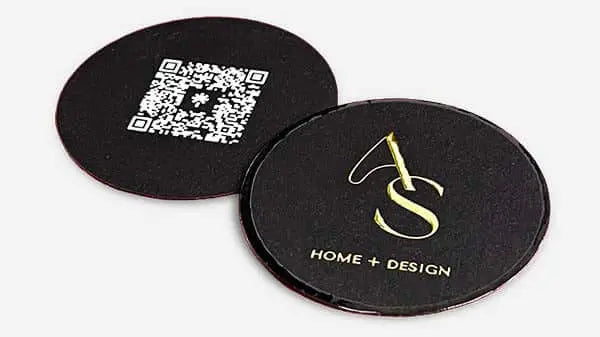


10 Must-Have Business Card Elements for Standout Branding
TL;DR:
- A company’s first impression is often its business card, making quality essential.
- Effective design emphasizes logo clarity, hierarchy, minimal contact info, and premium finishes.
- Less clutter and strategic use of materials and layout enhance memorability and professional impact.
72% of people judge a company by the quality of their business card. That number should stop you in your tracks. Your card is often the first physical thing a potential client or partner holds from you. It speaks before you do. A weak card signals a weak brand. A strong one opens doors. This article breaks down the essential elements every professional card needs, from logo placement and contact details to finishes and layout. If you want your card to work as hard as you do, these are the details that matter.
Table of Contents
- 1. Logo and branding essentials
- 2. Name and job title placement
- 3. Contact information: smart and selective
- 4. Design elements that differentiate
- 5. Layout, hierarchy, and white space
- Our take: Why less is more in business card design
- Upgrade your business cards with premium designs
- Frequently asked questions
Key Takeaways
| Point | Details |
|---|---|
| Brand first | Center your card design on a clear logo and on-brand visuals for instant recognition. |
| Keep it focused | Prioritize only the most important contact and professional details, leaving out clutter. |
| High-quality finishes | Premium paper, foil, and unique features increase retention and perceived value. |
| Structure matters | Strategic layout and white space make a well-designed card easy to read and memorable. |
1. Logo and branding essentials
Your logo is not decoration. It is the anchor of your entire card. Every other element should support it, not compete with it. When someone picks up your card, the first thing their eye should land on is your brand mark. That moment of recognition is what makes you memorable.
A strong brand mark is the most recalled element of a business card. That is not a coincidence. Logos carry visual weight. They communicate industry, personality, and quality in a fraction of a second. If your logo is small, buried, or inconsistent with your other materials, you are losing that advantage before the conversation even starts.
Beyond the logo itself, your brand identity in business cards includes your color palette, typeface choices, and overall visual style. These elements need to be consistent across every touchpoint, from your website to your card. Inconsistency reads as unprofessional, even if the individual pieces look fine on their own.
Here is what to lock in before you print:
- Logo version: Use a version built for small formats. Fine details get lost at card scale.
- Color accuracy: Specify Pantone or CMYK values. Screen colors and print colors are different.
- Font consistency: Use the same typeface family you use in your other brand materials.
- Clear space: Give your logo room to breathe. Crowding it reduces its impact.
- Contrast: Make sure your logo reads clearly against whatever background you choose.
“Your card is a physical extension of your brand. If the logo looks off, the whole card feels off.”
Pro Tip: If you are working with a designer, bring your full brand style guide to the first meeting. This saves revisions and keeps your card aligned with everything else you produce.
A unique business card design does not mean a complicated one. It means a card where every element, including your logo, has a clear purpose and a clear place.
2. Name and job title placement
With your brand visuals in place, your personal information needs to shine without overpowering the design. Your name and job title are the human layer of your card. They tell people who you are and why they should care.
Placement matters more than most people realize. Clear hierarchy helps ensure your name is remembered. That means your name should be the largest personal text element on the card. Your title comes second, slightly smaller, and positioned close to your name so they read as a unit.
Here is a simple approach to getting this right:
- Set your name in a larger size. It should be immediately readable, not something someone has to squint to find.
- Choose a title that reflects your actual role. Vague titles like “Consultant” or “Specialist” do not communicate much. Be specific.
- Position both near the center or lower third of the card. This creates visual balance with your logo at the top.
- Avoid using all caps for your name. Mixed case is easier to read and feels more personal.
- Keep title length short. If your full title is long, consider a shorter version for the card.
“People remember names when they are easy to find and easy to read. Make yours the first thing they see after your logo.”
One mistake professionals make is trying to list every credential or role they hold. This creates clutter and dilutes the impact of your actual name. A step-by-step business card design process helps you prioritize what stays and what goes.
Also worth noting: the back of the card is an option. If you want to include a secondary title or a tagline, the back gives you space to do it without crowding the front. Check out things to avoid on business cards before you finalize your layout.
3. Contact information: smart and selective
Next, let’s address how much and what kind of contact information actually moves the needle. The instinct is to include everything. Phone, email, address, fax, two websites, three social handles. Resist that instinct.

Too much information reduces conversion rates from card exchanges. When someone has to scan a wall of text to find your email, they often give up. The goal is to make it effortless to reach you.
Stick to the essentials:
- Phone number: One number. The one you actually answer.
- Email address: Professional domain, not a Gmail or Yahoo address.
- Website: Your primary URL, nothing more.
- One social handle or QR code: Choose the platform where you are most active and most professional.
| Contact detail | Include? | Notes |
|---|---|---|
| Mobile phone | Yes | Primary contact number only |
| Yes | Use your business domain | |
| Website | Yes | Keep URL short and clean |
| Physical address | Optional | Only if clients visit in person |
| Fax number | No | Outdated for most industries |
| Multiple socials | No | Pick one, link the rest via QR |
QR codes are worth considering in 2026. A single code can link to your full contact profile, portfolio, or booking page. It replaces five lines of text with one scannable element. That is a clean trade.
Pro Tip: Use a URL shortener or a custom domain redirect for your QR code destination. It looks cleaner and lets you update the link without reprinting cards.
Knowing what not to put on a business card is just as important as knowing what to include.
4. Design elements that differentiate
With the must-have basics covered, it’s time to gain the edge with finishes and materials that make cards memorable. This is where good cards become great ones.
Premium finishes and unique stocks increase retention rates by 42%. People keep cards that feel special. A card that has texture, weight, or a visual effect gets picked up again. A flat, thin card gets forgotten in a drawer.
Here is a quick comparison of popular finishing options:
| Finish type | Visual effect | Tactile effect | Best for |
|---|---|---|---|
| Foil stamping | Metallic shine | Smooth, raised | Luxury brands, executives |
| Spot UV | Glossy contrast | Subtle texture | Creative professionals |
| Embossing | Dimensional depth | Raised surface | Premium service providers |
| Die-cut | Custom shape | Unique edge | Brands with strong visual identity |
| Soft-touch matte | Muted, elegant | Velvety feel | Minimalist, modern brands |
Material choices matter just as much:
- Thick paper stock: 16pt or higher communicates quality immediately.
- Double-layer cards: Two sheets bonded together, often with a colored core.
- Clear plastic cards: Translucent, bold, and completely distinctive.
- Fine textured paper: Adds tactile interest without extra finishing steps.
42% higher retention is not a small number. It means nearly half of the people who receive a premium card will hold onto it longer. That is more chances for them to reach out.
The right creative fonts for business cards can also add personality without adding clutter. Typography is a finishing touch that most people overlook.
5. Layout, hierarchy, and white space
Once you have chosen your materials and finishes, the final differentiator is how you compose and space each element. A card can have all the right pieces and still look wrong if the layout is off.
Balanced layouts and strategic white space improve information recall by 30%. White space is not wasted space. It is the breathing room that makes each element stand out. When everything is packed together, nothing stands out.
Here is how to approach layout with intention:
- Establish a visual hierarchy. Logo first, name second, contact details third. The eye should move in a clear order.
- Align elements consistently. Left-aligned, centered, or right-aligned. Pick one and stick with it.
- Use a grid. Even a simple two-column structure keeps things organized.
- Leave margins. At least 3mm of clear space around all edges. This protects content from trimming and looks intentional.
- Limit font sizes to two or three. One for your name, one for your title, one for contact details.
Pro Tip: Print a test card before your full run. What looks balanced on screen can feel crowded in hand. A single proof print saves you from a costly mistake.
Common layout mistakes include centering everything without purpose, using too many font styles, and placing contact info too close to the card edge. Review best practices for card layout before you finalize your design. The details for brand impact come together when layout decisions are deliberate, not accidental.
Our take: Why less is more in business card design
We work with professionals who want their cards to do real work. And the pattern we see most often is this: the best cards are the ones that hold back.
Not because they are boring. Because they are confident. A card with one strong logo, clean typography, and a premium stock does not need five social handles or a paragraph of credentials. It communicates authority through restraint.
The professionals who get the most out of their cards are the ones who treat them as a positioning tool, not a data sheet. They choose one finish that fits their brand. They cut the details that do not serve the person receiving the card. They invest in materials that feel as good as their work.
The essential details for business cards are not about filling space. They are about making every square inch count. When you get that right, the card opens conversations that a crowded, template-printed card never could.
Upgrade your business cards with premium designs
Ready to bring these must-have elements into your own business cards? Everything covered here, from logo placement to premium finishes, comes together when the design and production process is built around your brand specifically.
At BcardsCreation, every card is developed individually. No templates. No automated editors. You get expert design guidance, material consultation, and controlled production from start to finish. Explore custom business card design to start your project, check out creative business cards for specialty finishes and foiling options, or browse all business cards to see the full range of what is possible.
Frequently asked questions
What is the single most important element on a business card?
Your brand logo is the most recalled and impactful element on any business card. A strong brand mark is what people remember long after the conversation ends.
Should I include my full address on my business card?
It is no longer necessary for most professionals. Include only the contact details your clients actually use, and too much information reduces how likely someone is to follow up.
What makes a business card look premium?
Premium cards use quality materials, unique finishes, and a clean, elegant layout. Premium finishes and unique stocks increase retention rates by 42%, which means people hold onto them longer.
Are QR codes on business cards a good idea?
When used thoughtfully, QR codes make it easy to connect digitally without crowding your card. One code can replace multiple lines of contact information and link to a full profile or portfolio.
How much white space is too much on a business card?
Aim for enough white space to separate elements and guide the eye, not so much that information is hard to find. Balanced layouts and strategic white space improve information recall by 30%.
Recommended
- 7 Impactful Business Card Features for Brand Leaders – BcardsCreation
- 7 Essential Business Card Design Tips for Creatives – BcardsCreation
- Must-have details on business cards for brand impact – BcardsCreation
- 7 Luxury Business Card Ideas to Elevate Your Brand – BcardsCreation
- Cards of Hope | Almost Impossible


